
A Fiverr gig not ranking means Fiverr’s search algorithm isn’t showing your gig to buyers searching for your service. It’s caused by weak relevance signals, poor engagement data, or performance metrics that fall below competing gigs. All of these are fixable — but not with the advice that’s been floating around since 2021.
You’ve probably already tried the basics. Changed your title. Added keywords to your description. Maybe refreshed your thumbnail. Still nothing.
Here’s the thing: Fiverr’s algorithm in 2026 is fundamentally different from what most “ranking guides” describe. It’s running machine learning models that weigh buyer-seller compatibility, engagement patterns, and conversion signals — not just keyword density. Outdated advice doesn’t just fail. It actively hurts your ranking.
Why Fiverr Gig Ranking Got Harder in 2026
According to Fiverr’s own Help Center documentation updated in 2025, gig placement is now determined by “multiple quality and business-related signals over time” — not a single keyword match. The algorithm considers relevance, historical performance, client satisfaction, and response behavior simultaneously.
The platform has also grown. More sellers, more gigs, more competition in every category. A gig that ranked easily in 2022 now competes against sellers who’ve been optimizing continuously for three years.
Some sellers argue that new gigs simply can’t rank anymore without reviews — and there’s truth in that for high-competition categories. But it’s not the whole picture. The counter-intuitive reality: a focused, niche gig with zero reviews consistently outranks a generic, keyword-stuffed gig with 5 reviews. Specificity beats volume at the entry level.
The 7 Fixes — In Order of Impact
Fix 1 — Your Gig URL Is Permanently Broken (And You Don’t Know It)
This is the fix nobody talks about. And it’s killing more gigs than anything else on this list.
When you create a gig, Fiverr generates your URL from the very first title you type — before you hit save. That URL never changes. Ever. Even if you rewrite your title 20 times after that.
So if your first title was something generic like “I will do graphic design work,” your URL is now /i-will-do-graphic-design-work — and Fiverr’s algorithm reads that URL as a primary relevance signal. A weak URL means weak SEO weight from day one, permanently.
The fix for existing gigs: you can’t change the URL. What you can do is create a new gig with your keyword-optimized title ready before you open the creation form. Never use the live editor as a draft.
To [fix your Fiverr gig URL problem], follow these steps:
- Write your final keyword-optimized title in a text document first
- Open a new gig creation form
- Paste your title immediately — before typing anything else
- Verify the URL preview shows your target keyword
- Complete the rest of the gig setup from there
Fix 2 — Your Title Formula Is Wrong
Most sellers write titles like this: “I will create amazing professional logo design with fast delivery.”
That title has three problems. “Amazing” and “professional” are filler words that every seller uses. “Fast delivery” is a feature, not a benefit. And there’s no niche qualifier telling the algorithm — or the buyer — exactly who this gig is for.
The formula that consistently outranks in 2026 is: Primary Keyword + Niche Qualifier + Compelling Outcome. Keep it under 80 characters. Fiverr truncates anything longer in search results, and a truncated title signals low quality to buyers before they even click.
Wrong: I will design a logo for your business Right: I will design a minimalist logo for SaaS startups in 24 hours
The second title tells the algorithm your niche, tells the buyer their outcome, and leaves no ambiguity about who it’s for. That specificity drives higher CTR — and CTR is one of Fiverr’s strongest ranking signals.
ALSO READ: How to get your first Fiverr order without experience
Fix 3 — You’re Using 2 or 3 Tags Instead of 5
Fiverr gives you exactly five tag slots. According to data tracked by eRank (the leading Fiverr SEO analytics tool), the majority of low-ranking gigs use fewer than four tags — and those that do use all five often fill them with single words like “logo” or “design” instead of multi-word phrases.
Tags are treated as secondary keywords by Fiverr’s algorithm. Single-word tags are nearly useless because no buyer types just “logo” into the search bar. They type “minimalist logo design” or “logo for restaurant.”
Use all five tags. Make them 2–4 word phrases. Use Fiverr’s own autocomplete to confirm real buyers are searching those exact phrases — those autocomplete suggestions are pulled from actual search data.
Quick note: don’t repeat your main title keyword in all five tags. Spread your coverage to capture different search queries from the same buyer pool.
Fix 4 — Your Thumbnail Is Losing the Click Before the Algorithm Can Help You
High impressions but low orders? Your thumbnail is the problem.
Fiverr’s algorithm tracks CTR (click-through rate) as a ranking signal. If buyers see your gig in search and don’t click, the algorithm interprets this as low relevance — and drops you further down. Your thumbnail isn’t just a visual. It’s a ranking factor.
The thumbnails that win in 2026 share three traits: they’re readable at 150×150 pixels (the size Fiverr shows in search), they state the service explicitly in text (not just imagery), and they use contrast that stands out against the white Fiverr search page.
I’ve seen conflicting data on whether video thumbnails consistently outperform static ones — some Fiverr sellers report a 40% conversion lift from gig videos, others see no change. My read is this: a great static thumbnail outperforms a poor gig video every time. Start with the thumbnail, add a video once you’re getting clicks.
Fix 5 — Your Response Rate Is Quietly Destroying Your Ranking
Look — if you’re checking Fiverr once a day, your ranking is suffering. Fiverr’s algorithm explicitly weights responsiveness as a quality signal. Sellers who respond within one hour consistently rank higher than identical gigs with slower response times.
This isn’t optional. It’s mechanical.
The fix is simple: turn on Fiverr notifications on your phone. Set a personal rule to respond within 2 hours during your waking hours. If you’re traveling or unavailable, use Fiverr’s “Out of Office” feature — it protects your response rate during planned absences.
Or maybe I should say it this way: your gig ranking is partly your calendar problem, not just your SEO problem.
Fix 6 — Your Gig Description Has a Keyword Stuffing Problem (Or the Opposite One)
Two types of sellers land here. The first stuffed their description with keywords until it reads like a list — “logo design logo designer professional logo custom logo brand logo.” The second wrote a beautiful description that reads naturally but never mentions their target keyword more than once.
Both descriptions rank poorly.
Fiverr’s 2026 algorithm penalizes robotic keyword stuffing the same way Google does. But it also needs enough keyword signals to understand what your gig is about. The balance point: use your primary keyword in your first sentence, once in the middle section, and once near your CTA. Three natural mentions. That’s it.
What most guides skip: your FAQ section inside the gig is also indexed by Fiverr’s search. Writing 3–5 FAQs that naturally include secondary keywords gives you additional relevance signals that most sellers leave completely empty.
Fix 7 — You’re Not Sending Any External Traffic Signal
Fiverr’s algorithm rewards gigs that generate clicks from outside Fiverr. When someone visits your gig from a Facebook post, a WhatsApp message, or a blog link, it sends a demand signal to the algorithm — “real people outside Fiverr are looking for this seller.”
You don’t need thousands of external clicks. Even 20–30 external visits per week can noticeably lift a stalled gig’s ranking. Share your gig in relevant Facebook groups, LinkedIn posts about your niche, or WhatsApp communities of potential clients.
One competing viewpoint worth acknowledging: some sellers argue external traffic is a myth and Fiverr only cares about on-platform behavior. That’s valid for established gigs with strong internal metrics. For new or stalled gigs with thin performance data, external signals fill the gap while you build on-platform history.
Quick Comparison — What’s Hurting vs What’s Helping
| Factor | Hurts Ranking | Helps Ranking |
|---|---|---|
| Gig URL | Generic first title | Keyword in URL from day one |
| Title | Filler words, keyword stuffing | Niche + keyword + outcome, under 80 chars |
| Tags | Single words, fewer than 5 | 5 multi-word phrases from autocomplete |
| Thumbnail | Small text, generic design | Clear text, high contrast, readable at 150px |
| Response time | Over 24 hours | Under 1 hour consistently |
| Description | Stuffed or keyword-thin | Primary keyword 3x, FAQs with secondary keywords |
| External traffic | None | 20–30 weekly visits from social/community shares |
You Chose the Wrong Main Keyword
Many people create a gig around a keyword that is:
- too competitive
- too generic
- not buyer-intent focused
That is why your Fiverr gig may not show in search.
Best Fiverr keyword rule:
Choose a keyword that is:
- specific
- buyer-focused
- less saturated
- directly related to your service
Example:
Instead of:
logo design
Try:
minimal business logo design
or
modern feminine brand logo
That gives you a better chance of ranking.
Your Gig Is New and Not Indexed Properly Yet
Sometimes your Fiverr gig is active, but it is still not fully visible because Fiverr needs time to process and re-index it. Fiverr officially says that after edits or updates, a gig may temporarily disappear from search while the system re-indexes the information.
What to do:
- wait 24–72 hours
- do not keep editing repeatedly
- search using your exact gig title
- search in incognito mode
Top 10 Fiverr Gig Ideas for Beginners in Pakistan (2026 Guide)
10 Best Earning Apps in Pakistan to Earn Money Online in 2026
Better Fiverr gig SEO strategy:
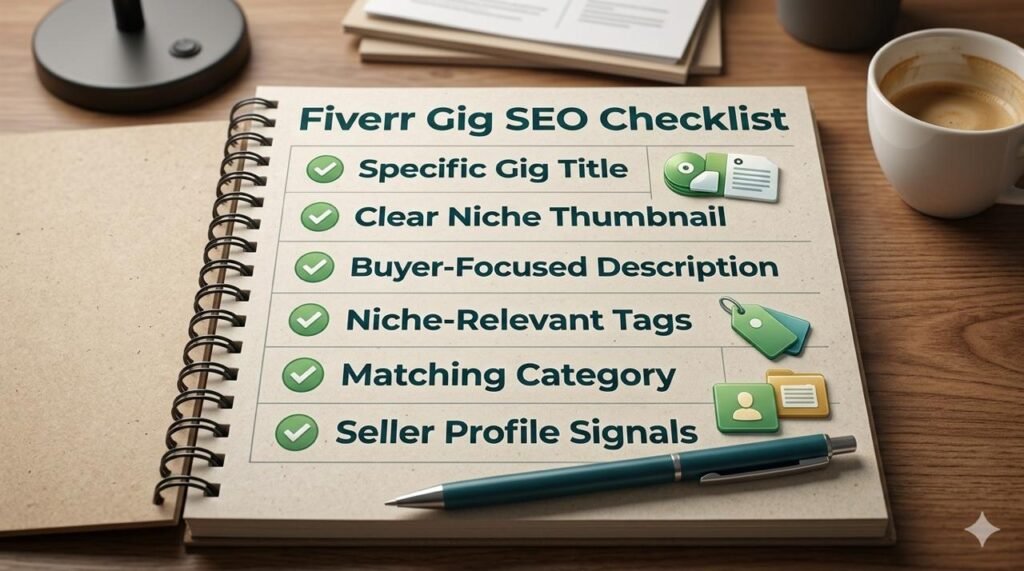
Final Thoughts
If your Fiverr gig is not ranking, do not assume the platform is dead.
Most of the time, the real problem is one of these:
- wrong keyword
- broad niche
- weak thumbnail
- poor click rate
- too many edits
- low conversion
Once you fix those properly, your gig has a much better chance of getting impressions, clicks, and eventually orders. The goal is not just to “show up” in Fiverr search. The real goal is to create a gig that Fiverr wants to show and buyers actually want to click. That is what leads to better Fiverr ranking over time.
FAQs
Why is my Fiverr gig not ranking?
Your Fiverr gig may not be ranking because of weak keywords, a broad title, low CTR, poor conversion, too many edits, or high competition.
How to rank Fiverr gig faster?
To rank your Fiverr gig faster, focus on niche-specific keywords, a strong thumbnail, better tags, a clear description, and improved conversion signals.
Why is my Fiverr gig not showing in search?
A Fiverr gig may not show in search if it is newly published, recently edited, under re-indexing, incorrectly optimized, or affected by performance and policy signals.
Does editing a Fiverr gig affect ranking?
Yes, editing a Fiverr gig can temporarily affect visibility because Fiverr may need time to re-index the updated information.
What is the best Fiverr SEO strategy for beginners?
The best Fiverr SEO strategy is to choose a low-competition service keyword, use a specific title, create a strong thumbnail, and optimize the gig for clicks and conversion.

4 thoughts on “Why Your Fiverr Gig Isn’t Ranking – 7 Fixes That Actually Work in 202”